Biometric Attendance Software in Pune: The Complete Buyer’s Guide
Pune has grown into one of Western India’s most important business centres. Large IT parks anchor Hinjewadi, Kharadi and Magarpatta, established manufacturing units run through Pimpri-Chinchwad, Bhosari and Chakan, and a fast-expanding network of startups, retail chains and educational institutions fills the rest of the city. With that growth comes a familiar problem: businesses that began with an attendance register or a basic swipe machine now struggle to track attendance accurately as their teams expand.
If you are evaluating options right now, this guide covers everything worth knowing before you choose biometric attendance software in Pune: what it is, how it works, which features matter, which industries benefit most, the mistakes to avoid, and how Timeexa’s flat per-employee pricing makes the decision easier than most buyers expect. For the platform overview, visit our biometric attendance software in Pune page.
What Is Biometric Attendance Software?
Biometric attendance software uses an employee’s unique physical characteristics, such as a fingerprint or a face, to verify identity and mark attendance automatically. Unlike manual registers or basic ID-card systems, it almost completely removes proxy attendance, because no two people share the same fingerprint or facial structure.
Quick answer
The best choice for a Pune business pairs the right device for each site with cloud software that feeds payroll, leave and reports automatically. IT parks usually favour face recognition, factories favour fingerprint or RFID, and field staff use a mobile app with GPS.
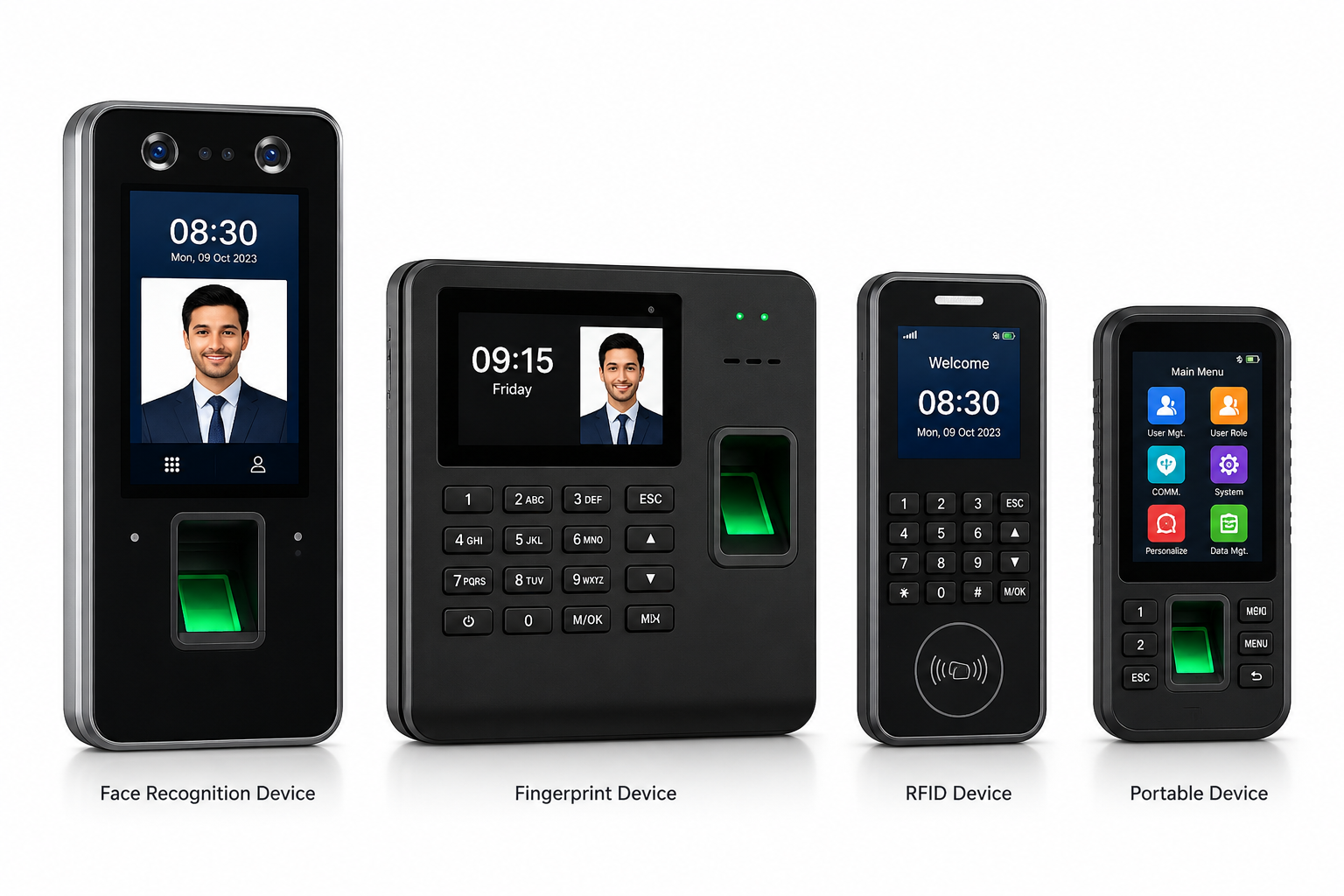
Timeexa’s biometric attendance software in Pune supports several verification methods, so each business can choose what suits its environment:
Face recognition
Fast, contactless and hygienic, well suited to corporate offices and IT parks.
Fingerprint
Dependable and cost-effective, ideal for factories with large workforces.
RFID card
Simple tap-in, tap-out tracking for high-footfall entry points. Our biometric attendance machine software also supports QR code attendance.
How Biometric Attendance Software in Pune Works
Behind a two-second punch sits a short chain of events. Knowing it helps you ask vendors sharper questions and spot where a weak system will let you down.
- EnrolmentEach person’s face, fingerprint or card is registered once, usually in seconds, and linked to their employee record.
- Template storageMost modern systems keep a mathematical template of the trait rather than a photograph. Ask any vendor to confirm precisely how theirs works.
- Matching at the gateOn a punch, the device compares the live scan with the stored template and accepts or rejects it almost instantly.
- Cloud syncAccepted punches travel to the cloud dashboard, so HR sees them without anyone downloading files from a device.
- Rules, payroll and reportsShift timings, late marks, overtime and leave are applied automatically, then flow into salary and live reports.
That last step is where employee attendance software Pune employers feel the difference. A device alone records a punch; connected software turns it into a payslip, a leave balance and a report, with no retyping in between.
Choosing the Right Biometric Attendance System in Pune: Fingerprint, Face or RFID
There is no single winner. The best method depends on the site, the headcount and how people arrive. Here is how the three compare for a biometric attendance system Pune businesses can deploy:
| Factor | Fingerprint | Face recognition | RFID card |
|---|---|---|---|
| Best for | Factories and plants with large crews | IT parks, offices and showrooms | High-footfall gates and fast setups |
| Contact needed | Finger on a sensor | None, fully touchless | Card tap only |
| Speed at peak entry | Quick with several readers per gate | Fast for steady flows | Fastest tap-in |
| Cost across many gates | Lower per device | Higher per device | Low, plus cards |
| Proxy punching risk | Very low | Very low | Higher, as cards can be lent |
| Typical Pune site | Chakan, Bhosari, Talegaon | Hinjewadi, Kharadi, Magarpatta | Large campuses and mixed gates |
Many Pune companies run a mix: face recognition at a Kharadi office and fingerprint readers at a Chakan plant, both reporting into the same dashboard. That is possible only when the software, not the device, is the centre of the system.
Why Pune Businesses Are Moving to Biometric Attendance Software
Several forces are pushing Pune businesses off manual systems and onto proper biometric attendance software in Pune:
Rapid business growth
Teams that scale from a handful of people to hundreds find manual tracking simply breaks down.
Multiple locations
Operations across Hinjewadi, Kharadi and Pimpri-Chinchwad need cloud attendance software Pune companies can view centrally rather than site by site.
Payroll accuracy
As teams grow, small attendance errors turn into real payroll losses every month.
Audit readiness
Larger companies face more scrutiny in labour audits, and accurate biometric records make them smoother.
Proxy attendance costs
Owners increasingly see how much buddy punching and time theft cost them across a year.
Want to see it at your Pune office or plant? Get a free demo.
Get Free Demo on WhatsApp →Common Attendance Problems in Pune Workplaces, and How the Software Solves Them
Few businesses buy attendance software because they love technology. They buy it to end specific problems that keep coming back every month. If any of these sound familiar, a connected system will remove them at the source:
| Problem | What it looks like | How biometric software helps |
|---|---|---|
| Buddy punching | One colleague signs in for another who is absent. | Identity is checked by face or fingerprint at the point of entry. |
| Month-end payroll scramble | Days spent reconciling registers before salaries can go out. | Attendance flows into payroll automatically. |
| Late-mark disputes | Arguments over who arrived when. | Timestamped records and clear grace-period rules settle it. |
| Unclear field attendance | Sales and service staff reported by phone call. | Selfie and GPS check-ins with geo-fencing. |
| Overtime confusion | Extra hours claimed from memory. | Overtime is calculated from recorded punches. |
| Scattered branch data | A separate register for every site. | One cloud dashboard across all locations. |
Pune’s Business Map: What Each Zone Usually Needs
Pune is not one market. Each zone has its own rhythm, and the right attendance setup follows it:
| Zone | Typical business | Common challenge | Best-fit setup |
|---|---|---|---|
| Hinjewadi, Kharadi, Magarpatta | IT parks and services firms | Hybrid days and large morning rushes. | Face recognition plus the mobile app. |
| Talawade and Pimpri-Chinchwad | IT, engineering and mixed industry | Several buildings and varied shifts. | Multi-device cloud setup with shift rules. |
| Bhosari, Chakan, Ranjangaon | Auto and auto-ancillary plants | Three shifts, overtime and contract crews. | Fingerprint or RFID with payroll sync. |
| Baner, Wakad, Viman Nagar | Startups, agencies and retail | Small teams with flexible hours. | Face recognition or mobile attendance. |
| Hadapsar and city retail hubs | Showrooms and multi-outlet chains | Staggered shifts across many outlets. | Face recognition per store, one dashboard. |
| Campuses and hospitals | Education and healthcare | Rotating timetables and round-the-clock duty. | RFID or face with shift management. |
Buyer’s Checklist: What to Evaluate Before You Choose Biometric Attendance Software in Pune
This is the part most guides skip: the actual checklist to run through before you settle on the best biometric attendance system Pune has to offer.
1. Is it cloud-based?
A cloud setup lets you check attendance from anywhere, whether you are at a Hinjewadi office or travelling. On-premise systems tie you to one location and are harder to scale across branches. See our cloud attendance software.
2. One platform or separate tools?
The biggest buyer mistake is buying attendance from one vendor and payroll from another. Timeexa runs attendance, leave, shifts and payroll management software together, so nothing is reconciled by hand. It works as attendance management software Pune teams can run end to end.
3. Does it support mobile and GPS?
For field sales staff, delivery teams or people visiting client sites across Pune, the mobile attendance app with GPS workforce tracking is essential, not optional.
4. What does year two cost?
Some vendors advertise a low introductory price and raise renewal fees sharply. Ask directly, and get the rate in writing.
5. Is local support real?
When a device or login fails, you need it fixed fast. Confirm responsive local support, not just a generic call centre.
6. Is pricing transparent?
You should not need to decode a pricing page or call sales to learn what you will pay next year. Clear numbers protect your budget.
Our Products: Complete Workforce Management Solutions
Attendance is only the start. Timeexa’s six products run on one platform, so a Pune business can begin with biometric attendance and add payroll, field tracking or visitor control whenever it needs them. Explore everything on the Timeexa home page, or open any product below.
Biometric Attendance System
Verifies each person by face, fingerprint, RFID card or QR code, and pushes every punch to the cloud in real time.
- Face Recognition Attendance
- Fingerprint Attendance
- RFID Card Support
- QR Code Attendance
- Real-Time Cloud Sync
Cloud Attendance Software
Runs attendance, shifts, leave and holidays from a secure dashboard you can open from any device.
- Multi-Company Management
- Multi-Branch Support
- Employee Self Service
- Attendance Dashboard
- Leave Management
Payroll Management Software
Turns verified attendance into salary, overtime and payslips, without anyone retyping hours.
- Salary Automation
- Overtime Calculation
- PF & ESI Support
- Payslip Generation
- Payroll Reports
GPS Workforce Tracking
Keeps field staff, technicians and drivers accountable with location-based attendance and visit records.
- Live Location Tracking
- Geo-Fencing
- Route Monitoring
- Visit Tracking
- Mobile Attendance
Mobile Attendance App
Lets employees mark attendance from their own phones, with a selfie and location as proof.
- Selfie Attendance
- Geo Attendance
- Mobile Attendance
- Leave Requests
- Attendance History
Visitor Management System
Replaces the gate register with OTP-verified visitor check-ins, photo capture and digital passes.
- Visitor Registration
- OTP Verification
- Visitor Pass Printing
- Employee Approval Workflow
- Reception Dashboard
Three-Shift Plants, Overtime and Contract Staff
Plants around Bhosari, Chakan and Ranjangaon rarely run a neat nine-to-five. Three shifts, overtime in busy weeks and a mix of permanent and contract workers are normal, and each is a classic source of wage disputes when handled on paper.
- Shift rules are set once. Morning, evening and night patterns are configured in the software, so late and early marks follow the shift each person was actually assigned.
- Overtime comes from real punches. Extra hours are paid for what was worked, not what a supervisor remembers.
- Contract and permanent staff share one report. You can still filter them separately when payroll is processed.
- Floor visibility is live. Supervisors see who is present at handover and can cover a gap before output suffers.
When these rules live in the same platform as payroll, the salary run reads from the attendance record instead of a supervisor’s notebook, which is where most month-end arguments begin.
Hybrid IT Teams and Field Staff
In Hinjewadi, Kharadi and Baner, the question is rarely whether people work from home; it is how to keep one consistent record when days are split between the office, home and client sites.
- Employees check in from their phone with a selfie and location on days they work away from the office.
- Geo-fencing defines which locations count as a workplace.
- Office punches and mobile check-ins land in one record, giving a single attendance history per person.
- Managers see who is in, remote or on leave in a single view.
- Leave requests and approvals sit alongside attendance, so planned absences never look like gaps.
Setting Up Attendance Rules the Right Way
Software enforces the policy you give it, so a little thought up front prevents most future arguments. Before you go live, decide the following and write it down:
- Working hours and shifts for each team, including weekly offs and the holiday calendar.
- A grace period for arrival, and how many late marks lead to a deduction or a half day.
- Half-day and short-leave thresholds, so partial days are treated the same way for everyone.
- Overtime rules, including who can approve extra hours and how they are paid.
- Leave types and balances, with clear approval steps for managers.
A practical tip
Share the written rules with staff before the system goes live. Employees accept automatic enforcement far more easily when the rules were explained first, and managers spend less time handling exceptions after the switch.
Educational Institutions, Hospitals and Facility Teams in Pune
Pune’s reputation as an education hub, and its large healthcare and facility-services sectors, create attendance needs that look very different from an IT park or a factory.
- Schools and colleges manage teaching and non-teaching staff on varied timetables. Face recognition or RFID at the gate records arrival without a queue at the office, and leave approvals sit in the same system.
- Hospitals and clinics run round-the-clock duty across doctors, nurses and support staff. Shift management keeps rotations clear, while visitor management helps control access around patient areas.
- Facility management companies post staff at many client premises. Geo-fenced mobile check-ins confirm that someone is at the assigned site, not just somewhere in the city.
- Campuses and large offices receive a steady stream of guests. OTP-verified visitor check-ins replace the handwritten register at reception.
In each case the same platform covers staff and visitors, so administrators work from one dashboard instead of juggling separate tools for each need.
Industries We Serve: Solutions for Every Industry
Timeexa provides attendance and workforce management for a wide range of sectors, from corporate offices to construction sites.
- Corporate Offices
- Manufacturing Units
- Schools & Colleges
- Hospitals & Healthcare
- Government Organizations
- Construction Companies
- Logistics & Transport
Which Pune Industries Benefit Most?
Biometric attendance software in Pune delivers strong value across a wide range of sectors:
- IT companies & tech parksHinjewadi, Kharadi and Magarpatta teams with hybrid schedules.
- Manufacturing & automobilePimpri-Chinchwad, Bhosari and Chakan plants on rotating shifts.
- Retail chains & showroomsOutlets across Pune’s commercial hubs.
- Logistics & transportDrivers and warehouse crews on the move.
- Construction companiesLarge, shifting on-site crews.
- Hospitals & clinicsRound-the-clock shift staffing.
- Educational institutionsStaff and student attendance across campuses.
- Facility managementTeams posted at multiple client sites.
Companies with units outside Pune can run the same platform in Mumbai, Nagpur, Ahmedabad, Hyderabad and Bangalore. You can also browse our full industries list.
Beyond Attendance: What Else You Get
A smart buyer looks past simple attendance tracking. Timeexa bundles connected modules that most standalone attendance apps do not offer:
- Payroll management — automated salary, PF, ESI and payslip generation, synced directly from attendance data.
- Leave management — digital leave requests and one-click manager approval, with automatic balance tracking.
- Shift management — rotational and night shifts without manual roster confusion.
- Visitor management — OTP-verified check-ins and digital passes through the visitor management system, useful for offices and factories alike.
- Real-time reports — instant visibility into attendance, productivity and payroll cost.
Because these modules share one platform, attendance numbers never fail to match payroll at month-end, a common headache with disconnected tools.
Ready to replace registers? Talk to us on WhatsApp.
Get Free Demo on WhatsApp →Attendance Reports Worth Checking Every Week
A dashboard is only useful if someone reads it. Owners and HR leads who get the most from their employee attendance software Pune teams use build a short, steady review habit around a handful of reports:
- Daily snapshot: who is present, absent, late or on leave, checked first thing each morning.
- Weekly absenteeism by department: spotting a team where absences are creeping up before it becomes a pattern.
- Overtime by shift or team: confirming extra hours are approved and sensible rather than routine.
- Branch comparison: setting offices or plants side by side to see where lateness or absence is highest.
- Leave balances: noticing unused leave early, so teams are not caught short at year-end.
- Pre-payroll summary: a final attendance check before salaries are processed through payroll management software.
Look at trends rather than single days. One late arrival is noise; the same person arriving late three weeks running is information you can act on, and live data lets you act on it while it still matters.
What to Test in a Demo Before You Buy
A demo is your best chance to see how a system behaves with your real situation. Do not settle for a standard walkthrough; ask the vendor to show you these:
- A late arrival and an early exit under your own shift and grace-period rules.
- A leave request raised by an employee and approved by a manager.
- Overtime recorded on a night shift and carried into a sample payroll run.
- A mobile check-in from outside the office with selfie and location.
- A report showing two branches side by side on one dashboard.
- What happens when a device loses its internet connection, and how data catches up afterwards.
- How a new joiner is added and how a leaver is removed, including their biometric record.
- How quickly support answers during the demo itself.
Getting Your Staff On Board
The software is only as good as its adoption. A transparent rollout turns a potentially awkward change into a routine one:
- Explain the whyTell employees what is being collected, why, and how it will be protected, preferably in writing.
- Enrol in batchesRegister staff team by team, so queues stay short and questions get answered on the spot.
- Run a pilotStart with one department or shift, fix any rule that feels off, then widen the rollout.
- Go live and reviewSwitch payroll to the new data and review the first reports with managers.
How Biometric Attendance Software in Pune Pays for Itself
Business owners often see attendance software as a cost rather than a saving, but the arithmetic usually points the other way. Take a mid-sized Pune company with 100 employees. Even a modest 3 percent attendance error, caused by proxy punching, rounding mistakes or forgotten manual entries, can put thousands of rupees of wrong pay into payroll every month.
An illustration, not a guarantee
This example assumes 100 employees at an average monthly wage of ₹20,000. Your own wages, headcount and error rate will differ, so use it to frame the question rather than as a promise.
Tying payroll directly to verified attendance removes most of that loss. Add the HR hours saved from not correcting registers, chasing late submissions or resolving disputes, and the return becomes clear within the first few months.
What Teams of Different Sizes Pay
Pricing is a flat ₹10 per employee per month, so your cost is simply headcount multiplied by ten:
| Team size | Per month | Per year | Typical Pune business |
|---|---|---|---|
| 25 employees | ₹250 | ₹3,000 | Startup or small agency |
| 100 employees | ₹1,000 | ₹12,000 | Mid-sized services firm or workshop |
| 300 employees | ₹3,000 | ₹36,000 | Auto-ancillary plant or large campus team |
| 1,000 employees | ₹10,000 | ₹1,20,000 | Large manufacturer or multi-site enterprise |
Data Security, Privacy and Compliance
A fingerprint or face template is personal data, so how a vendor stores and protects it matters as much as how fast the device reads it. Ask every vendor:
- Is biometric data encrypted, and stored as a template rather than a raw image?
- Who inside your company can see attendance records, and can access be limited by role?
- How is data backed up, and how is it restored if something fails?
- What happens to a person’s biometric record after they leave?
- Are employees told in writing what is collected and why?
India’s Digital Personal Data Protection Act, 2023 governs how personal data is handled, so take professional advice on your current obligations; official updates are posted at meity.gov.in. Employers must also keep proper attendance, hours, overtime and leave records under the labour laws that apply to them. Whether PF and ESI apply to you depends on headcount and wage levels, which change from time to time, so check the Employees’ Provident Fund Organisation and the Employees’ State Insurance Corporation.
Common Buyer Mistakes to Avoid
| Mistake | What it costs you | A better approach |
|---|---|---|
| Choosing on device cost alone | Weak software features and slow support. | Judge the whole package, not just the hardware. |
| Skipping a demo | Mismatched expectations after you have paid. | Test it on your own shifts and rules first. |
| Not asking about backup and security | Risk to sensitive employee data. | Ask about encryption and recovery before signing. |
| Ignoring scalability | A system built for 30 staff struggles at 300. | Pick a cloud platform that adds people and sites easily. |
| No payroll integration | Manual reconciliation work every month. | Confirm attendance feeds payroll directly. |
| Skipping staff communication | Resistance and avoidable disputes. | Explain the rules and the data use before launch. |
Making the Final Decision
By now you should have a clear checklist: cloud access, one connected platform, mobile and GPS support, transparent pricing and responsive local support. Run every vendor through the same list rather than comparing on price alone, because a cheaper device that lacks payroll integration or local support usually costs more in lost time over the year. The goal is not simply to buy biometric attendance software in Pune; it is to buy a system your HR team will rely on every day without friction.
Timeexa’s Biometric Attendance Software Pricing — Just ₹10/Employee/Month
If you are comparing biometric attendance software in Pune for a growing business, Timeexa brings attendance, payroll, leave, shifts, GPS tracking and visitor management onto one connected platform at a flat per-employee rate. Learn more on the Timeexa website.
- Pay only for the employees you track
- No hidden charges
- No long-term lock-in contracts
- Fingerprint, face, RFID and QR code attendance supported
- Attendance, leave, shift and payroll on one platform
For example, a 100-person company pays ₹1,000 a month and a 300-person plant pays ₹3,000 a month. See the full details on our pricing page.
Frequently Asked Questions
1. What should I look for first when buying biometric attendance software in Pune?
Start by checking whether the software is cloud-based, whether it connects directly with payroll and leave management, and whether it supports mobile/GPS attendance for field staff. Many buyers focus only on the biometric device itself and overlook these connected features, which end up mattering far more for day-to-day HR operations once the system is in daily use.
2. Is Timeexa's biometric attendance software really free for the first year?
Yes. Timeexa provides the complete biometric attendance software in Pune, including payroll integration and leave management, free for the entire first year, subject to standard terms and conditions. From the second year onward, renewal is a fixed ₹999 per year, with no unexpected price increases.
3. Which biometric method is better — fingerprint or face recognition?
It depends on your setup. Face recognition attendance is touchless and fast, making it ideal for offices and IT parks with high morning footfall. Fingerprint attendance is more cost-effective and reliable for factories or manufacturing units with large workforces checking in across multiple shifts. Timeexa supports both within the same platform.
4. Can this software manage attendance across multiple Pune locations?
Yes. Timeexa is fully cloud-based, so attendance data from offices or factories across Hinjewadi, Kharadi, Pimpri-Chinchwad, or anywhere else in Pune syncs to one centralized dashboard, letting HR heads and owners monitor everything from a single login.
5. Does the software connect with payroll automatically?
Yes. Attendance data — working hours, late arrivals, overtime, and approved leaves — flows directly into Timeexa’s payroll management software, automating salary, PF, and ESI calculations and removing the need for manual cross-checking every month.
6. Is biometric attendance software suitable for small businesses in Pune, or only large companies?
It works well for both. Small businesses benefit from removing manual attendance errors early, while larger companies rely on it to handle scale, multiple locations, and compliance requirements. Timeexa’s pricing model, with a free first year, is specifically designed to make this accessible for smaller Pune businesses too.
7. How long does implementation take?
Implementation is typically quick — Timeexa’s team handles device installation, employee enrollment, and dashboard training, and most businesses are fully operational within a day or two, with minimal disruption to daily operations.
8. Can field employees mark attendance outside the office?
Yes. Timeexa’s mobile attendance app allows field sales staff, delivery teams, and employees visiting client sites to mark selfie-based, GPS-verified attendance from their location, giving managers accurate, real-time visibility even for teams that aren’t desk-based.
9. What happens if I don't renew after the first free year?
If you choose not to renew, your access to the platform ends, but there are no penalties or hidden charges — the pricing is transparent from the start. Most businesses do renew, since ₹999 per year is a small cost compared to the time and payroll accuracy the system delivers.
10. Is my company's biometric and attendance data secure with Timeexa?
Yes. All biometric and attendance data is stored in encrypted form within Timeexa’s secure cloud infrastructure, with role-based access controls ensuring only authorized HR and management personnel can view sensitive employee information.
11. Does Timeexa offer local support in Pune?
Yes, Timeexa provides dedicated support for businesses across Pune, covering installation, employee onboarding, and any technical issues after go-live, ensuring quick resolution rather than long downtime.
12. Can this system also handle visitor check-ins at our office or factory?
Yes. Timeexa includes a Visitor Management System with OTP-verified check-ins and digital passes, useful for corporate offices, IT parks, and factories that need a secure, professional process for handling client visits, vendor meetings, and interviews.