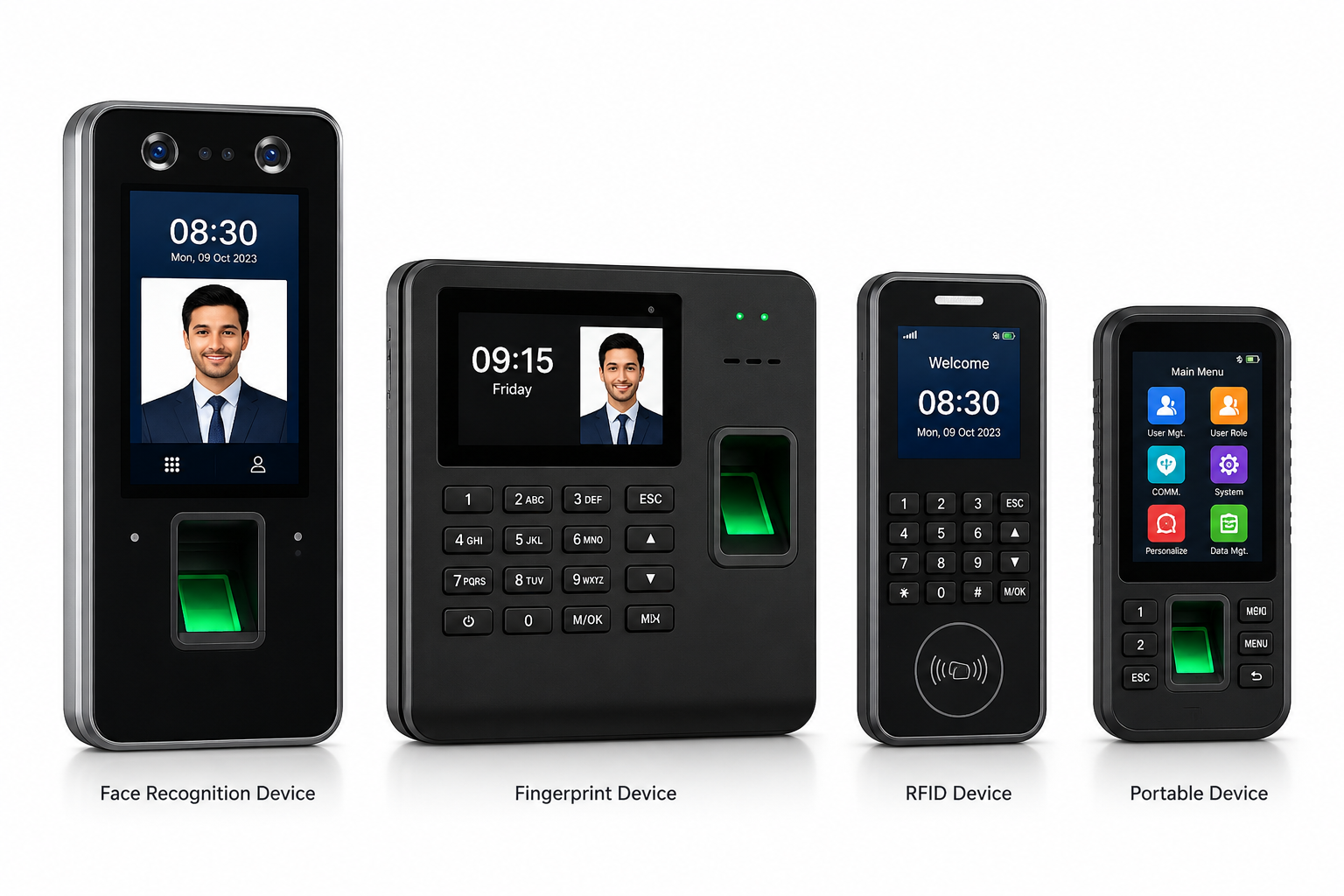

Face Recognition Attendance System in Lucknow: Fast, Contactless Attendance for Growing Businesses
As businesses across Lucknow grow and modernise, one attendance technology has moved from novelty to operational necessity: face recognition. A face recognition attendance system in Lucknow offers something that manual registers, swipe cards and even fingerprint scanners cannot fully match, a contactless, fast and highly accurate way to confirm who an employee is the moment they walk through the door.
This guide explains how a face recognition attendance system works, why it is gaining ground among Lucknow employers, where it performs best and what to look for before you buy. It also shows how Timeexa’s flat per-employee pricing keeps the cost predictable. For the full platform, see our biometric attendance machine software page.
What Is Face Recognition Attendance Software?
Face recognition attendance software uses a camera-enabled device to scan an employee’s face and match it against their enrolled profile before marking attendance. Unlike fingerprint or RFID methods, nothing needs to be touched. Employees simply look toward the device, and the system confirms who they are within moments.
Quick answer
A face recognition attendance system verifies identity by matching a live face scan to a stored profile, then logs a timestamped punch to the cloud. It suits busy offices, high-footfall entrances, healthcare settings and any workplace where speed and hygiene matter.
That makes it especially suitable for busy shift changes in factories, high-footfall corporate offices and healthcare facilities where fewer shared touchpoints is a priority.
How a Face Recognition Attendance System Works
Behind a one-second glance sits a short sequence of steps. Understanding it makes it easier to judge any vendor’s claims:
- EnrolmentThe device captures a clear image of each employee’s face and links it to their record, department and shift.
- Template creationMost modern systems convert the face into a mathematical template instead of keeping a plain photograph. Ask your vendor to confirm exactly how theirs works.
- Live matchingWhen someone stands at the device, it compares the live scan with the stored templates and accepts or rejects the match.
- Logging and rulesAn accepted match is timestamped, and shift, grace-period and late-mark rules are applied automatically.
- Cloud sync and payrollThe record goes to the cloud dashboard and flows into leave, overtime and salary calculations.
Face Recognition Attendance Software Features Worth Paying For
Two devices can look identical and still deliver very different results, because the difference lies in the software. When you compare face recognition attendance software, check for these capabilities:
Real-time cloud sync
Punches should appear on the dashboard within moments, so HR sees attendance as it happens, not at the end of the day.
Shift and rule engine
Grace periods, late marks, half days and night shifts should be configurable, and applied automatically to every punch.
Easy enrolment and re-enrolment
Adding, correcting and removing faces should take minutes, because people join, leave and change appearance all the time.
Payroll connection
Attendance should flow directly into salary, overtime and payslips, with no export step in between.
Multi-method support
The same face recognition attendance software should also support fingerprint, RFID and mobile check-ins, so one platform covers every entrance.
Reliable local support
If a device stops working on a Monday morning, quick help matters more than any feature list.
Why Lucknow Businesses Are Choosing a Contactless Face Recognition Attendance System
The shift toward a contactless face recognition attendance system in Lucknow is not only about convenience. It reflects practical advantages that growing teams notice quickly:
Speed during peak hours
Facilities where many people check in together, such as factories at shift change or offices with a standard start time, benefit from face recognition, which avoids the queues a single fingerprint scanner can create.
Hygiene considerations
Since the pandemic, many businesses have become more conscious of shared surfaces. A contactless device removes that concern entirely.
Less hardware wear
Devices that need physical contact wear faster, especially in dusty or damp industrial settings. A face recognition device avoids that issue.
Hard to circumvent
A card can be lent to a colleague, but facial features cannot be shared, which makes face recognition a strong deterrent to buddy punching.
Want to test it at your Lucknow entrance? Get a free demo.
Get Free Demo on WhatsApp →Getting the Best Accuracy From a Face Recognition Attendance System in Lucknow
Accuracy depends on more than the device. Lucknow’s bright summers, dusty roads and busy entrances create conditions worth planning for. These are the factors that matter most:
| Factor | Why it matters | Practical fix |
|---|---|---|
| Lighting | Strong backlight or deep shadow can confuse the camera. | Place the device away from direct sunlight and avoid bright windows behind the user. |
| Camera height and angle | A device set too high or low catches poor angles. | Mount it at average face height and test with shorter and taller staff. |
| Enrolment quality | A poor first image leads to repeated mismatches. | Enrol in good light, facing the camera, with a neutral expression. |
| Glasses, caps and beards | Large changes in appearance can affect matching. | Re-enrol when someone changes their look significantly. |
| Face coverings | Masks or scarves hide features used for matching. | Agree a clear entry policy, and ask the vendor how they handle partial faces. |
| Dust and a dirty lens | A smudged camera reduces image quality. | Wipe the lens regularly and shield the device in dusty areas. |
Photos, Videos and Proxy Attempts: What to Ask Vendors
The whole point of face recognition is that a colleague cannot punch in for you. Smart buyers therefore ask how a system copes with attempts to fool it, such as holding up a photograph or playing a video.
- Does the device use any form of liveness detection to tell a real face from a photo or screen?
- How does it behave when the face is partly covered or at a poor angle?
- Are failed and repeated attempts logged, so unusual patterns can be reviewed?
- Can a supervisor see the captured image or event details when an entry is disputed?
- Can face recognition be combined with another method, such as a card, at sensitive entrances?
Ask for a live demonstration rather than a brochure answer, and test it with your own staff at your own entrance.
Face Recognition vs Other Biometric Attendance Systems in Lucknow
Face recognition has clear advantages, but it sits within a wider range of options. Fingerprint attendance remains reliable and cost-effective, particularly where camera positioning is inconsistent, and RFID cards offer a flexible alternative for teams that prefer card-based access. The right choice depends on the environment:
| Site | Best-fit method | Note |
|---|---|---|
| Office with a fixed entrance and steady lighting | Face recognition | Touchless and quick, with a professional feel. |
| Factory floor with variable lighting | Fingerprint, with face recognition as a second option | A combination covers difficult lighting at some gates. |
| Large campus gate | RFID or face recognition | Fast tap-in or look-in for large crowds. |
| Hospital staff entrance | Face recognition or RFID | Fewer shared touchpoints across rotating shifts. |
| Field and remote staff | Mobile app with selfie and GPS | Attendance away from any fixed device. |
Timeexa’s platform supports face recognition, fingerprint and RFID, so a business can choose per site and still report everything in one place.
Face Recognition Attendance for Offices in Lucknow
For corporate offices across Gomti Nagar, Vibhuti Khand and Hazratganj, face recognition attendance for offices offers a professional, modern check-in that matches how growing companies want to present themselves to staff and visitors. Beyond convenience, offices gain:
- Faster morning check-ins, which reduce queues at building entrances during peak arrival times.
- Accurate late-mark tracking, since attendance is timestamped precisely rather than entered manually.
- Visitor management alongside staff attendance, so the same front desk can verify both employees and guests with the visitor management system.
- Hybrid-friendly records, because office punches and mobile check-ins merge into a single attendance history.
Hybrid and Multi-Entrance Offices: One Dashboard for Everything
A growing Lucknow company often ends up with a head office, one or two branch offices and staff who work from home on certain days. Good face recognition attendance for offices keeps all of that in one view instead of several disconnected ones:
- Each entrance, whether at Gomti Nagar or a branch elsewhere, reports into the same cloud dashboard.
- Employees who work remotely mark attendance through the mobile app, merging with office punches.
- Managers see their own team while HR sees every location.
- Common leave and shift rules apply across offices, with local variations where needed.
- Month-end payroll runs once from verified records for every site.
Face Recognition Attendance for Factories in Lucknow
Manufacturers face a different set of demands. Face recognition attendance for factories has to handle large numbers of workers checking in within a short window, often across several shifts a day, in places like Amausi, Chinhat, Sarojini Nagar and Talkatora. A well-designed system should:
- Process attendance quickly enough to avoid bottlenecks at shift change.
- Track attendance accurately against rotational and night shift schedules.
- Sync data in real time to a cloud dashboard, so managers and HR see who is on the floor.
- Cope with dust and varied lighting through careful device placement and regular cleaning.
Paired with cloud attendance software, this lets Lucknow manufacturers monitor attendance across several production lines, or several factory locations, from a single dashboard.
Our Products: Complete Workforce Management Solutions
A face recognition attendance system in Lucknow is only as useful as the platform behind it, and the device is just the entry point. Timeexa’s six products run on one platform, so the same data can feed payroll, field tracking and visitor control. Explore everything on the Timeexa home page, or open any product below.
Biometric Attendance System
Verifies each person by face, fingerprint, RFID card or QR code, and pushes every punch to the cloud in real time.
- Face Recognition Attendance
- Fingerprint Attendance
- RFID Card Support
- QR Code Attendance
- Real-Time Cloud Sync
Cloud Attendance Software
Runs attendance, shifts, leave and holidays from a secure dashboard you can open from any device.
- Multi-Company Management
- Multi-Branch Support
- Employee Self Service
- Attendance Dashboard
- Leave Management
Payroll Management Software
Turns verified attendance into salary, overtime and payslips, without anyone retyping hours.
- Salary Automation
- Overtime Calculation
- PF & ESI Support
- Payslip Generation
- Payroll Reports
GPS Workforce Tracking
Keeps field staff, technicians and drivers accountable with location-based attendance and visit records.
- Live Location Tracking
- Geo-Fencing
- Route Monitoring
- Visit Tracking
- Mobile Attendance
Mobile Attendance App
Lets employees mark attendance from their own phones, with a selfie and location as proof.
- Selfie Attendance
- Geo Attendance
- Mobile Attendance
- Leave Requests
- Attendance History
Visitor Management System
Replaces the gate register with OTP-verified visitor check-ins, photo capture and digital passes.
- Visitor Registration
- OTP Verification
- Visitor Pass Printing
- Employee Approval Workflow
- Reception Dashboard
Attendance Management Software Lucknow Businesses Can Connect to Face Recognition
Timeexa’s face recognition attendance system is built into a broader attendance management software Lucknow employers can run end to end, so it does not operate in isolation. Once a face is recognised, the record connects directly with:
- Payroll management — working hours, late marks and overtime calculated automatically through payroll management software. See our payroll software in Lucknow page for local details.
- Leave management — approved leave adjusts attendance and payroll without manual edits.
- Shift management — attendance is tracked against rotational and night shift schedules.
- GPS workforce tracking — for hybrid teams combining office and field staff, through GPS workforce tracking and the mobile attendance app.
- Visitor management — the same verification mindset extended to front-desk guest check-ins.
The result is that you are not just buying a device but implementing a complete workforce management system that grows with you. For the wider HR picture, read about HRMS software in Lucknow.
Ready to go contactless? Talk to us on WhatsApp.
Get Free Demo on WhatsApp →Schools, Hospitals, Retail and Facility Teams
Face recognition is not limited to offices and plants. Several other Lucknow sectors benefit as much:
- Schools and colleges record staff arrival at the gate without a queue at the office, with leave approvals in the same system.
- Hospitals and clinics reduce shared touchpoints at busy staff entrances, and run rotating shifts through shift management.
- Retail in Hazratganj, Aminabad and Alambagh gets quick setup at each outlet, with every store feeding one dashboard.
- Facility and security teams posted at client sites combine device attendance with geo-fenced mobile check-ins.
- Logistics and warehouses log crews at the gate and track field staff through GPS.
Seasonal and Contract Staff: Adding and Removing People Fast
Lucknow’s retail, hospitality and events businesses take on extra staff around festivals, wedding season and big sales, and many factories use contract crews. These temporary workers are the hardest to track on paper, because their names are unfamiliar and their stay is short.
- Enrol a new worker in minutes on their first day, so the first shift is recorded properly.
- Remove them as soon as the contract ends, so the record is clean and no one can punch in by mistake.
- Keep temporary and permanent staff in one report, but filter them separately for payroll.
- Use per-employee pricing to scale cost up and down with the actual team size.
Where to Install a Face Recognition Device: A Placement Checklist
Even the best face recognition attendance system in Lucknow gives poor results in a bad spot. Walk the entrance before you install, and check these points:
- Away from direct sunlight and bright windows behind the user.
- At average face height, with enough clear space to stand in front.
- Where people naturally slow down, not in a narrow corridor that causes a pile-up.
- Near a reliable power point, ideally with a backup for power cuts.
- Within good network coverage, so punches sync to the cloud promptly.
- Protected from rain, dust and accidental knocks.
- With a second unit planned for gates that carry a heavy rush.
Face Recognition Attendance Machine Price in Lucknow: What You Really Pay
When you research face recognition attendance machine price options, look beyond the hardware figure. Many providers add a recurring software subscription on top of the device, and those costs grow with your team. Break the total into its parts and compare like with like:
| Cost line | How it is usually charged | What to ask |
|---|---|---|
| Device | One-time, per unit | How many units does each entrance need, and what is the warranty? |
| Installation | One-time, per site | Is on-site setup included, and who handles the network? |
| Software | Recurring, often per employee | Is the rate flat, and does it change at renewal? |
| Support | Included or charged separately | How fast does someone respond in Lucknow? |
| Payroll and add-ons | Bundled or per module | Are payroll, leave and GPS included in the same rate? |
Timeexa prices the software as a flat ₹10 per employee per month, so the recurring part is simple to predict. Your free demo will walk through device options and installation for your site, so you can see the full picture before deciding.
Privacy, Consent and Face Data
A face template is personal data, so treat it with care. Tell employees in writing what is collected, why it is needed and how long it is kept. Ask the vendor how data is encrypted, who can access it, how it is backed up and what happens to a person’s record when they leave the company.
India’s Digital Personal Data Protection Act, 2023 governs how personal data is handled, so take professional advice on your current obligations; official updates are posted at meity.gov.in. Employers must also keep proper attendance, hours and leave records under applicable labour laws. Whether PF and ESI apply depends on headcount and wage levels, which change from time to time, so check the Employees’ Provident Fund Organisation and the Employees’ State Insurance Corporation.
Enrolment Day: A Simple Playbook
How you enrol people has more influence on accuracy than any setting. A calm, structured enrolment day prevents most later problems:
- Prepare the listHave every employee’s name, ID, department and shift ready before the device arrives.
- Set up a good enrolment spotChoose a well-lit place with even light on the face, and keep the lens clean.
- Enrol in batchesRegister staff team by team, checking that each person is matched correctly on the spot.
- Test at the real entranceHave staff try the device where it will actually be used, and re-enrol anyone who is rejected.
Troubleshooting: Common Face Recognition Problems and Fixes
| Problem | Likely cause | Fix |
|---|---|---|
| Frequent rejections in the afternoon | Strong sunlight hitting the camera or the face. | Move or shade the device, or add controlled lighting. |
| One person keeps failing | A poor or outdated enrolment image. | Delete and re-enrol them in good light. |
| Queues at peak time | One device serving too many people. | Add a second unit or split gates between methods. |
| Punches missing from the dashboard | Network or power interruption. | Check connectivity and power backup, and confirm data syncs afterwards. |
| Poor results in a dusty area | A dirty lens or exposed device. | Clean routinely and add a protective housing. |
Industries We Serve: Solutions for Every Industry
Timeexa provides attendance and workforce management for a wide range of sectors, from corporate offices to construction sites.
- Corporate Offices
- Manufacturing Units
- Schools & Colleges
- Hospitals & Healthcare
- Government Organizations
- Construction Companies
- Logistics & Transport
Businesses in nearby Uttar Pradesh cities can run the same platform in Kanpur, Varanasi, Gorakhpur, Agra and Noida. See every sector on our industries page.
What a Face Recognition Attendance System Pays Back
A face recognition attendance system that stops proxy attendance and feeds payroll directly tends to repay itself through accuracy alone.
An illustration, not a guarantee
This example assumes 80 employees at an average monthly wage of ₹18,000. Your own wages, headcount and error rate will differ, so use it to frame the question rather than as a promise.
What Teams of Different Sizes Pay
Pricing is a flat ₹10 per employee per month, so your cost is simply headcount multiplied by ten:
| Team size | Per month | Per year | Typical Lucknow business |
|---|---|---|---|
| 20 employees | ₹200 | ₹2,400 | Small office or clinic |
| 80 employees | ₹800 | ₹9,600 | Growing office or showroom |
| 200 employees | ₹2,000 | ₹24,000 | Mid-sized factory or campus |
| 500 employees | ₹5,000 | ₹60,000 | Large plant or multi-site operation |
Choosing the Best Attendance System for Your Business
When comparing attendance management software Lucknow offers, or any system for the best attendance setup in the city, work through these practical questions:
- Does the device handle your typical check-in volume without creating bottlenecks?
- Is the software cloud-based, so attendance can be reviewed remotely?
- Does it integrate directly with payroll, or will you need a separate system?
- What is the true cost over several years, including renewal?
- Is local installation and support available in Lucknow?
A face recognition attendance system in Lucknow gives businesses a faster, more hygienic and more secure way to track attendance than manual or traditional methods. Combined with integrated payroll, leave management and GPS tracking, it becomes the foundation of a complete workforce management system.
Timeexa’s Face Recognition Attendance System Pricing — Just ₹10/Employee/Month
With Timeexa, businesses across Lucknow can adopt a face recognition attendance system without a complicated pricing structure. Attendance, payroll, leave, shifts, GPS tracking and visitor management sit on one platform at a flat per-employee rate. Learn more on the Timeexa website.
- Pay only for the employees you track
- No hidden charges
- No long-term lock-in contracts
- Face, fingerprint, RFID and QR code attendance supported
- Attendance, leave, shift and payroll on one platform
For example, an 80-person business pays ₹800 a month and a 200-person unit pays ₹2,000 a month. See the full details on our pricing page.
Frequently Asked Questions
Q: Is face recognition attendance accurate in different lighting conditions?
Modern face recognition systems are designed to perform reliably across a range of lighting conditions, though extremely dim or inconsistent lighting can occasionally affect recognition speed. Businesses in variable-light environments sometimes pair face recognition with fingerprint verification as a backup.
Q: How fast is face recognition attendance compared to fingerprint scanning?
Face recognition typically processes attendance in under a second and doesn’t require employees to pause and align their finger with a sensor, making it noticeably faster during high-volume check-in periods.
Q: Can face recognition attendance be used alongside fingerprint or RFID?
Yes. Timeexa’s devices support face recognition, fingerprint, and RFID verification within the same platform, allowing businesses to use multiple methods depending on the situation or employee preference.
Q: Is face recognition attendance software expensive to maintain?
With Timeexa, the first year is completely free, and renewal from year two is a flat ₹999 per year, making long-term costs significantly more predictable than providers charging ongoing monthly fees.
Q: Does face recognition attendance integrate with payroll software?
Yes. Timeexa’s face recognition attendance data flows directly into payroll processing, automating salary calculations based on verified working hours without manual reconciliation.